


Skylum: Leading The Way In Ai Photo Editing
Photography is changing fast. Today, tools like Skylum help both beginners and professionals create amazing images without years of editing experience. Skylum has become a popular name in the world of digital photo editing, thanks to its powerful software and AI-driven features. But what makes Skylum stand out? Let’s explore how this company is shaping the future of photography.
What Is Skylum?
Skylum is a software company known for making photo editing tools. Founded in 2008, the company was once called Macphun before it rebranded to Skylum in 2018. Skylum’s main products—Luminar Neo and Aurora HDR—use artificial intelligence to make editing faster and easier.
Skylum started with apps for Mac but now supports both Mac and Windows users. With more than one million customers worldwide, Skylum’s tools are used by hobbyists and professionals who want simple ways to get great results.
Key Skylum Products
Luminar Neo
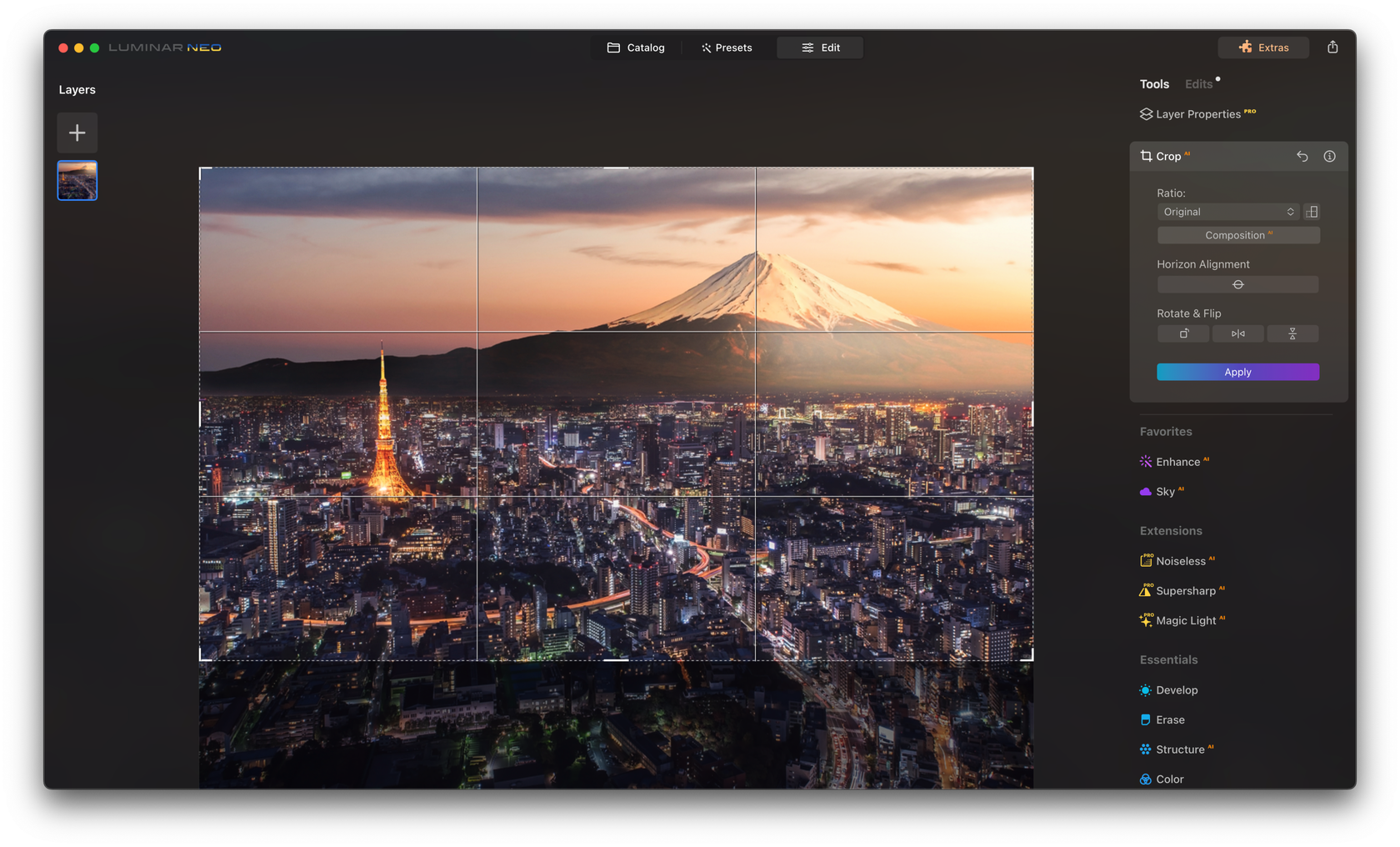
Luminar Neo is Skylum’s flagship software. It uses AI to analyze photos and suggest edits. You can quickly fix lighting, change backgrounds, remove unwanted objects, and enhance portraits with a few clicks.
Some standout features include:
- AI Sky Replacement: Swap skies instantly for more dramatic scenes.
- Portrait Enhancer: Smooth skin, brighten eyes, and remove blemishes.
- Relight AI: Adjust lighting in specific parts of a photo without affecting the rest.
- Dust Spot Removal: Clean up sensor spots automatically.
Luminar Neo supports RAW files, layers, and advanced editing, but its simple interface keeps things easy for beginners.
Aurora Hdr
Aurora HDR is designed for high-dynamic-range photography. It combines several exposures into one balanced image, preserving details in both shadows and highlights. Aurora HDR uses AI to merge photos smoothly, reduce halos, and avoid unnatural colors.
Key features:
- HDR Smart Structure: Enhance details without noise.
- One-Click Presets: Apply creative looks instantly.
- Batch Processing: Edit many photos at once.
Aurora HDR is popular with landscape and real estate photographers who want clear, eye-catching images.

Credit: www.linealight.com
Skylum Vs. Other Photo Editors
Choosing photo editing software can be confusing. Here’s how Skylum compares to two major competitors:
| Feature | Skylum Luminar Neo | Adobe Photoshop | Capture One |
|---|---|---|---|
| AI Tools | Advanced | Limited | Basic |
| User Interface | Beginner-Friendly | Complex | Professional |
| One-Time Purchase | Yes | No (Subscription) | No (Subscription) |
| RAW Support | Yes | Yes | Yes |
Skylum stands out for its AI tools and simple layout. Unlike Adobe and Capture One, Skylum offers a one-time purchase option, which many users prefer.
Who Uses Skylum Software?
Skylum’s users range from casual photographers to serious professionals. Many wedding, portrait, and landscape photographers choose Skylum because they can edit quickly and still get high-quality results.
For businesses, Skylum speeds up workflow. Real estate agents, e-commerce sellers, and content creators use Skylum to improve images for websites and social media. The software’s AI features help even users with no technical background.
Credit: skylum.com
How Does Skylum’s Ai Work?
Skylum’s software relies heavily on artificial intelligence. It uses machine learning algorithms trained on millions of photos. This means the software can recognize skies, faces, or objects and apply changes only where needed.
For example, the Sky Replacement tool cuts out the sky and blends a new one—matching colors and lighting automatically. The Portrait Enhancer detects facial features and lets you adjust eyes, skin, and lips separately. These smart tools save time and reduce the risk of mistakes.
Two non-obvious insights about AI editing:
- AI isn’t perfect—sometimes, complex scenes may need manual touch-ups. Skylum allows you to fine-tune edits after the AI suggestion.
- Batch editing with AI can produce consistent results across hundreds of images. This is very helpful for event or product photographers.
Price And Value
Skylum offers different pricing options. You can buy a perpetual license (one-time payment) or a subscription for extra features and updates.
Here is a simple comparison of Skylum’s pricing plans:
| Plan | One-Time Purchase | Subscription (Yearly) | Free Trial |
|---|---|---|---|
| Luminar Neo | $149 | $59/year | Yes (7 days) |
| Aurora HDR | $99 | Not Available | Yes (Trial) |
Skylum often gives discounts or bundles. Be careful—some advanced features may require extra purchases (like Extensions for Luminar Neo).
Skylum’s Place In The Photography World
Skylum has won several awards, including “Best Imaging Software” from TIPA and EISA. These awards show the company’s commitment to innovation.
One thing that sets Skylum apart is its active community. Users can join forums, webinars, and online groups to learn new techniques or share feedback. Skylum often updates its software based on user suggestions, making the tools better for everyone.
Practical Tips For Using Skylum
- Start with templates. Luminar Neo offers preset looks for fast results.
- Experiment with layers. You can blend different edits for creative effects.
- Use the comparison slider to see before-and-after changes.
- Save your own presets to speed up editing similar images in the future.
- Update regularly. Skylum often releases new AI tools and bug fixes.
Many beginners miss the value of combining AI tools with manual adjustments. AI does the heavy lifting, but fine-tuning often gives the best results.

Credit: www.stickpng.com
Frequently Asked Questions
What Operating Systems Does Skylum Support?
Skylum software runs on both Mac and Windows computers. Make sure your system meets the minimum requirements for smooth performance.
Is Skylum Good For Beginners?
Yes, Skylum’s interface is simple, and AI tools help new users edit photos with little experience. There are also built-in tutorials.
Can Skylum Edit Raw Files?
Absolutely. Both Luminar Neo and Aurora HDR support RAW formats from most camera brands, giving you more control over your edits.
How Does Skylum’s Ai Compare To Adobe’s?
Skylum’s AI is more focused on speed and ease of use, especially for tasks like sky replacement or portrait retouching. Adobe’s AI tools are improving but often require more manual setup. For a deeper look, visit the Wikipedia page.
Is There Customer Support?
Yes, Skylum provides email and live chat support, along with a large online help center and user community.
Skylum continues to push the boundaries of photo editing. With smart AI features and a focus on user experience, it’s a top choice for anyone who wants to improve their images—fast and easily. Whether you’re a hobbyist or a pro, Skylum’s tools can help you achieve your creative vision.




