

Zoho Books is an online accounting software. It simplifies financial management for businesses.
Managing finances can be tough. Zoho Books makes it easier. This software helps you track expenses, send invoices, and manage taxes. It’s designed for small to medium businesses. With Zoho Books, you keep all your financial data in one place.
It’s cloud-based, so you can access it anywhere. Understanding how Zoho Books works can save you time and stress. In this blog, we will explore its features and how it can benefit your business. Let’s dive in and see how Zoho Books can streamline your accounting tasks.

Credit: www.zoho.com
Introduction To Zoho Books
Are you tired of manually tracking your business finances? Do you often find yourself lost in a sea of receipts and invoices? Zoho Books might just be the solution you’re looking for. This powerful accounting software can simplify your financial management. Let’s dive into an introduction to Zoho Books and see how it can help streamline your business operations.
What Is Zoho Books?
Zoho Books is a cloud-based accounting software designed for small and medium-sized businesses. It helps you manage your finances, automate business workflows, and work collectively across departments. Think of it as a digital accountant that’s always there for you, ready to take the stress out of bookkeeping.
Key Features
Zoho Books comes packed with features that make it an indispensable tool for business owners. Here are some of the key features that stand out:
- Invoicing: Create professional invoices and send them to your clients in minutes. Customize templates to match your brand identity.
- Expense Tracking: Easily track and categorize your expenses. Attach receipts and stay on top of your spending.
- Bank Reconciliation: Link your bank accounts and reconcile transactions effortlessly. Keep your records accurate and up-to-date.
- Project Management: Manage your projects, track time, and bill clients accurately. Stay organized and meet deadlines.
- Multi-Currency Support: Do you deal with international clients? Zoho Books handles multiple currencies, making global transactions a breeze.
- Reports and Analytics: Generate detailed financial reports. Gain insights into your business performance and make informed decisions.
These features are just the tip of the iceberg. Zoho Books is designed to grow with your business, offering advanced tools as you need them. Ready to see how it works in action? Stay tuned for more in-depth exploration of Zoho Books and its functionalities.
Getting Started
Welcome to the world of Zoho Books! If you are new to this accounting software, don’t worry. We’ll walk you through the basics. Zoho Books is designed to make managing your business finances easy. From creating an account to setting up your business, you’ll be up and running in no time. So, let’s get started!
Creating An Account
First things first, you need to create an account on Zoho Books. Here’s a simple guide to help you through:
- Go to the Zoho Books website.
- Click on the Sign Up button.
- Enter your email address and password.
- Click on Create Account.
After creating your account, you will receive a verification email. Click on the link in the email to verify your account. Easy peasy, right?
Setting Up Your Business
Now that you have an account, it’s time to set up your business. This step is crucial as it tailors Zoho Books to your specific needs.
Here are the steps to follow:
- Log in to your Zoho Books account.
- Navigate to the Settings section.
- Select Organization Profile.
- Fill in your business name, address, and other details.
Need a break? Grab a coffee, and let’s continue!
Next, configure your financial settings:
- Set your currency and time zone.
- Enter your tax information.
- Connect your bank accounts.
These settings ensure that Zoho Books aligns perfectly with your financial operations.
There you go! You’re all set to start using Zoho Books for your business. Wasn’t that simple?
Stay tuned for more tips and tricks on making the most out of Zoho Books. Happy accounting!
Dashboard Overview
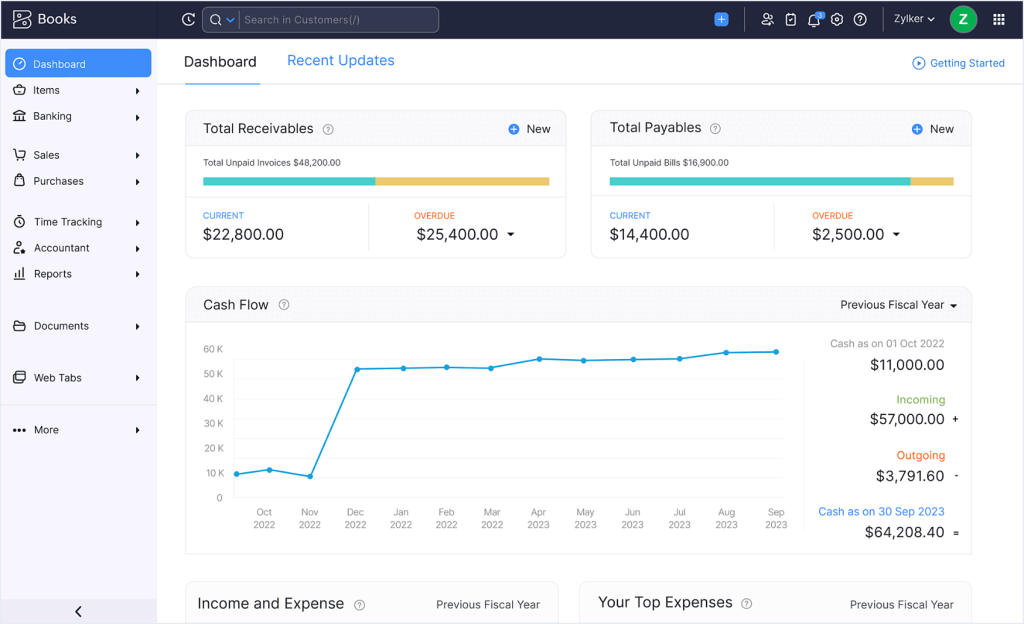
Welcome to the heart of Zoho Books! The dashboard is where you can get a quick glance at your financial health. It’s like having a personal assistant who gives you updates on your business’s financial state. Let’s dive into how to navigate and customize your dashboard for a seamless experience.
Navigating The Dashboard
When you first log in, the dashboard is the first thing you see. It’s designed to be user-friendly and intuitive. Here are some key areas you’ll notice:
- Key Metrics: Get a summary of your income, expenses, and profit.
- Invoices: See outstanding invoices and their due dates.
- Bank Accounts: View your connected bank balances.
Everything is laid out in a way that makes it easy to find what you need. If you can use a smartphone, you can navigate this dashboard!
Customizing Your View
Want to see something specific every time you log in? No problem! You can customize your dashboard to show the data that matters most to you. Here’s how:
- Click on the gear icon at the top-right corner.
- Select Customize Dashboard from the dropdown menu.
- Choose the widgets you want to display and arrange them as you like.
It’s like setting up your own workspace. You can add widgets for cash flow, expenses, or even recent transactions. This way, you get a personalized overview every time you log in.
So, why not make your dashboard work for you? With just a few clicks, you can have all your important data at your fingertips. It’s like having your own command center!
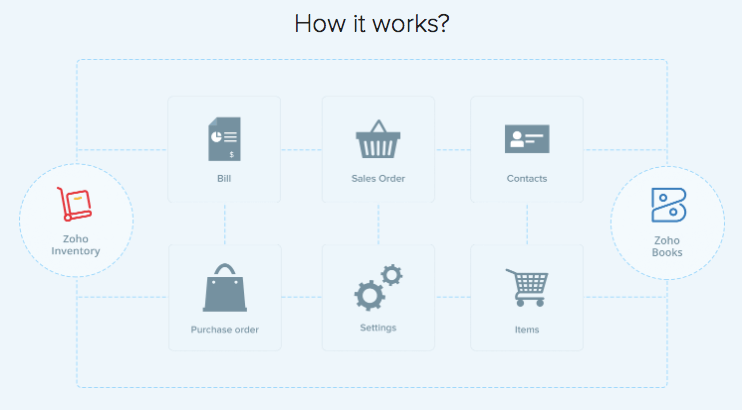
Credit: www.zoho.com
Managing Invoices
Managing invoices can often feel like a daunting task, especially if you’re juggling multiple clients and projects. But with Zoho Books, this process becomes much simpler. This powerful accounting software offers a range of features designed to make invoicing straightforward and hassle-free. Let’s dive into how Zoho Books helps you manage your invoices effectively.
Creating Invoices
One of the first steps in managing your finances is creating invoices. With Zoho Books, this task is quick and easy. Here’s how you can do it:
- Log in to your Zoho Books account.
- Navigate to the Invoices section in the dashboard.
- Click on the Create Invoice button.
- Fill in the necessary details such as client information, services provided, and payment terms.
- Save and send the invoice directly to your client via email.
Zoho Books allows you to customize your invoices with your company logo and preferred color scheme, making your brand look professional and consistent.
Tracking Payments
Tracking payments is crucial to ensure you get paid on time. Zoho Books offers several features to help you keep an eye on your cash flow:
- Payment Status: Easily check if an invoice is paid, partially paid, or overdue.
- Reminders: Set up automatic reminders for clients who haven’t paid their invoices yet.
- Payment Methods: Zoho Books supports multiple payment methods, including credit cards, PayPal, and bank transfers.
Imagine never having to chase down a late payment again! Zoho Books keeps you informed and helps you maintain a healthy cash flow.
By using Zoho Books, you can streamline your invoicing process, reduce errors, and ensure you get paid faster. Whether you’re a small business owner or a freelancer, this tool is designed to make managing your finances a breeze.
Expense Management
Managing expenses is crucial for any business, big or small. Zoho Books makes this task easier with its user-friendly features. Let’s dive into how you can keep track of your expenses using Zoho Books.
Recording Expenses
Recording expenses in Zoho Books is straightforward. You can add expenses manually or upload receipts. Here’s how:
- Manual Entry: Go to the Expenses tab and click on Add Expense. Fill in the details like date, amount, and category.
- Upload Receipts: You can upload receipts directly. Zoho Books will read the data and fill in the details for you.
Isn’t that convenient? Plus, you can categorize your expenses, making it easier to see where your money goes. This categorization helps in understanding spending patterns and planning better for the future.
Expense Reports
Generating expense reports in Zoho Books is a breeze. You can create detailed reports to get a clear picture of your spending. Here’s the process:
- Navigate to the Reports section.
- Select Expense Reports.
- Choose the time period you want to analyze.
These reports can be customized to show specific categories, making them even more insightful. You can also export these reports to Excel or PDF for sharing or further analysis.
Ever wondered how much you’re spending on office supplies? Or maybe travel expenses? These reports give you the answers, helping you make informed decisions.
Expense management is not just about tracking money. It’s about understanding spending habits and making smart choices. With Zoho Books, you’re not just managing expenses; you’re mastering them. So, give it a try and see the difference it makes!
Banking Integration
Welcome to the wonderful world of Zoho Books! If you’re looking to simplify your business finances, you’re in the right place. One of the standout features of Zoho Books is its Banking Integration. This feature allows you to link your bank accounts directly to Zoho Books, making your financial management smoother than ever. Let’s dive into how this works, starting with linking your bank accounts and moving on to reconciliation.
Linking Bank Accounts
First things first, let’s talk about linking your bank accounts. Imagine you no longer have to manually enter all your transactions. Sounds great, right? With Zoho Books, you can connect your bank account in just a few clicks. Here’s how:
- Navigate to the Banking Module: Find the banking section on your dashboard. It’s usually on the left side.
- Click on Add Bank or Credit Card: This option lets you add new accounts.
- Choose Your Bank: Select your bank from the list provided. Zoho Books supports a wide range of banks globally.
- Enter Your Credentials: You’ll need your online banking username and password. Zoho Books uses secure encryption, so no worries about safety.
- Authorize the Connection: Once you enter your details, Zoho Books will ask for permission to access your transactions. Click on authorize, and you’re all set!
Now, all your bank transactions will automatically sync to Zoho Books. It’s like having a little assistant who never sleeps!
Reconciliation
Next up, let’s talk about the reconciliation process. This is where Zoho Books really shines. Reconciling your bank statements with your accounting records ensures everything matches up perfectly. Here’s how to do it:
- Go to the Banking Module: Select the bank account you want to reconcile.
- Select Reconcile: This option allows you to start the reconciliation process.
- Match Transactions: Zoho Books will display your bank transactions and the entries in your ledger. Match these transactions by clicking on them.
- Adjust Discrepancies: If there are any mismatches, you can adjust the records. Sometimes, a transaction might be missing or duplicated. Fix these issues to ensure accuracy.
- Finalize Reconciliation: Once everything matches, click on finalize. Your books are now balanced!
Reconciliation might sound boring, but it’s crucial. Think of it as balancing your checkbook but in a digital, hassle-free way. Plus, it gives you a clear picture of your finances, which is always a good thing.
In summary, Zoho Books’ banking integration is a powerful tool that takes the headache out of financial management. By linking your bank accounts and easily reconciling your transactions, you save time and reduce errors. Give it a try, and you’ll wonder how you ever managed without it!
Tax Compliance
Navigating the maze of tax compliance can be overwhelming, especially if you’re new to it. Fortunately, Zoho Books simplifies this process, ensuring your business stays on the right side of the law. From calculating taxes to filing tax returns, let’s dive into how Zoho Books can become your best ally in managing tax obligations.
Calculating Taxes
We all know that calculating taxes can be a headache, but Zoho Books makes it much easier. The software automatically calculates taxes based on the latest tax rules and rates. Here’s how it works:
- Automatic Updates: Zoho Books keeps up with the latest tax regulations and updates the tax rates accordingly.
- Accurate Calculations: The software calculates the taxes for each transaction, ensuring accuracy.
- Customizable Tax Rates: You can set your own tax rates if needed, making it flexible for your business requirements.
Imagine no more manual calculations or worrying about whether you’ve applied the correct tax rate. Zoho Books takes care of it, so you can focus on growing your business.
Filing Tax Returns
Filing tax returns can be a daunting task, but Zoho Books streamlines the process. With just a few clicks, you can generate tax reports and file your returns. Here’s how:
- Generate Reports: Zoho Books generates detailed tax reports, summarizing your tax liabilities.
- Easy Filing: The software supports direct filing to various tax authorities, making the process seamless.
- Compliance Assurance: Zoho Books ensures that your returns are compliant with the latest tax laws.
Filing your tax returns has never been this straightforward. With Zoho Books, you can rest assured that everything is handled correctly and efficiently.
So, why stress about taxes when Zoho Books can simplify the entire process for you? From calculating taxes to filing returns, this software is designed to make your life easier. Give it a try, and experience the peace of mind that comes with knowing your tax compliance is in good hands.
Reporting And Analytics
When it comes to managing your business finances, having access to accurate and insightful reports can make all the difference. This is where Zoho Books shines with its robust reporting and analytics features. Whether you’re a small business owner or a financial manager, Zoho Books provides the tools you need to keep a close eye on your company’s financial health. Let’s dive into how Zoho Books works, focusing on Reporting and Analytics.
Generating Reports
Generating reports in Zoho Books is a breeze. The platform offers a wide variety of pre-built report templates that cater to different aspects of your business. From profit and loss statements to balance sheets, Zoho Books covers it all. Here’s how you can get started:
- Navigate to the Reports Module: Simply click on the Reports tab from the main dashboard.
- Select Your Report: Choose from various categories like Sales, Purchases, Inventory, and more.
- Customize Your Data: Filter by date range, customer, or other criteria to get the exact data you need.
- Generate and Export: Click on the Generate button to create your report, which you can then export as a PDF or Excel file.
With Zoho Books, you can generate reports quickly and efficiently, allowing you to focus on what’s important – growing your business.
Analyzing Financial Data
Once you have your reports, the next step is analyzing the data. Zoho Books provides intuitive tools that help you make sense of your financial information. Here are some key features:
- Visual Dashboards: Zoho Books offers visual dashboards that present data in a user-friendly format. Charts and graphs make it easy to spot trends and anomalies at a glance.
- Comparative Analysis: Compare different time periods to understand how your business is performing over time. This can help you identify seasonal trends and make informed decisions.
- KPIs and Metrics: Track key performance indicators (KPIs) such as revenue growth and expense ratios to gauge your financial health.
- Custom Insights: Create custom reports and insights tailored to your business needs. Whether it’s a detailed sales report or an in-depth expense analysis, Zoho Books has you covered.
By analyzing your financial data, you can uncover valuable insights that drive strategic decisions. This, in turn, helps you optimize operations and improve profitability.
In conclusion, Zoho Books simplifies the process of generating and analyzing financial reports. With its user-friendly interface and powerful analytics tools, you can stay on top of your business finances with ease. Whether you’re just starting out or looking to scale, Zoho Books provides the insights you need to succeed. So why wait? Give Zoho Books a try and see the difference it can make for your business!
Automation Features
Are you tired of spending countless hours on mundane accounting tasks? Well, let me introduce you to the magical world of automation in Zoho Books. Zoho Books is a powerful accounting software designed to make your life easier by automating those repetitive tasks that eat up your precious time. Let’s dive into some of the standout automation features that can help streamline your accounting processes.
Automating Workflows
Imagine having a virtual assistant who takes care of your routine tasks without you lifting a finger. That’s what automating workflows in Zoho Books feels like. With workflow automation, you can set up rules to automate various actions, such as:
- Sending invoices
- Generating reports
- Notifying clients
For instance, you can create a rule to automatically send a thank-you email to your clients as soon as they make a payment. Setting up these workflows is simple and involves selecting triggers and actions. It’s like having a superpower for your accounting tasks!
Recurring Transactions
Do you find yourself entering the same transactions over and over again? It can be tedious, right? Zoho Books has a fantastic feature called Recurring Transactions that can save you from this monotony. With recurring transactions, you can automate:
- Invoices
- Bills
- Expenses
For example, if you have a client who pays a fixed amount every month, you can set up a recurring invoice. Zoho Books will automatically generate and send the invoice at the specified intervals. You can even set up reminders to ensure you and your clients stay on top of payments. It’s like having a personal accountant who never forgets!
In conclusion, the automation features in Zoho Books are designed to make your accounting life much more manageable. By automating workflows and recurring transactions, you can save time, reduce errors, and focus on what truly matters – growing your business. So why not give it a try and see how these features can transform your accounting experience?
Credit: www.zoho.com
Customer Support
Customer support is vital for any software. Zoho Books offers excellent support to help you. They provide various resources and ways to contact their team.
Accessing Help Resources
Zoho Books has a comprehensive help center. It includes articles, guides, and FAQs. These resources cover many topics. You can find answers to common questions. The help center is user-friendly. You can search for specific topics easily. This is great for quick solutions.
Contacting Support
If you need more help, Zoho Books offers direct support. You can contact them via email or phone. Their support team is responsive. They aim to solve your issues quickly. You can also use the live chat feature. This is perfect for urgent questions.
Frequently Asked Questions
Is Zoho Books Similar To Quickbooks?
Zoho Books and QuickBooks are both accounting software. They offer similar features like invoicing, expense tracking, and financial reporting.
How Do I Receive Items In Zoho Books?
To receive items in Zoho Books, create a purchase receive. Go to “Purchases” and select “Receive”. Enter item details and save.
What Are The Benefits Of Zoho Books?
Zoho Books offers automation, real-time collaboration, and detailed financial reports. It integrates with multiple platforms, ensuring seamless business operations. The software is user-friendly and cost-effective, making accounting tasks easier and more efficient.
Is Zoho Books Easy To Use?
Yes, Zoho Books is user-friendly. Its intuitive interface makes accounting tasks simple, even for beginners. The software offers helpful tutorials and support.
What Is Zoho Books Used For?
Zoho Books is an online accounting software for managing finances, invoices, and expenses.
Conclusion
Zoho Books simplifies managing your business finances. It offers easy invoicing and expense tracking. Users can generate insightful reports quickly. Tax compliance becomes effortless with its built-in features. Collaboration with accountants is seamless. Zoho Books ensures data security and integrity.
Its interface is user-friendly, making it accessible. New users can easily learn and use it. Overall, Zoho Books enhances efficiency and accuracy in financial management. Give it a try to see the benefits.




