

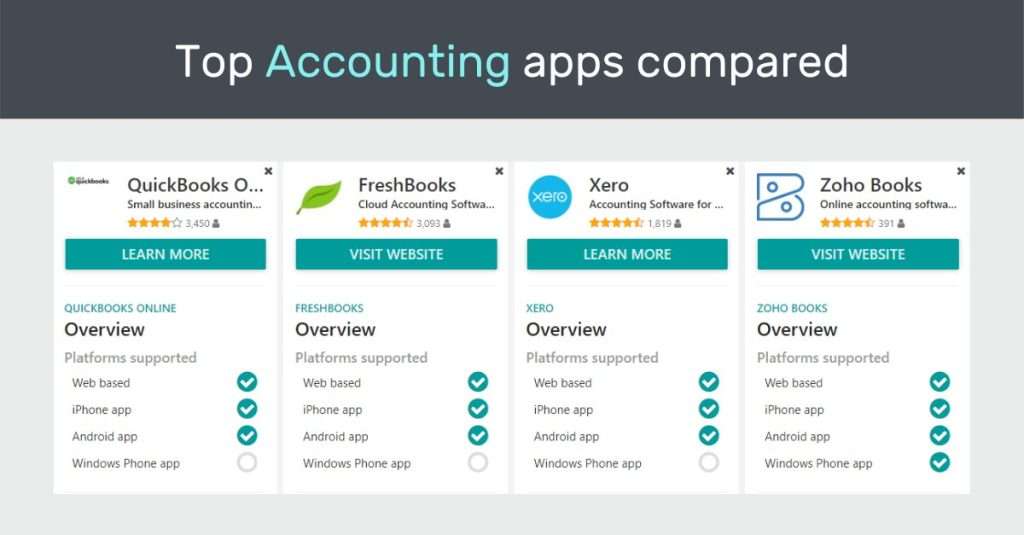
Zoho Books and FreshBooks are popular accounting software options. Both offer features for small businesses.
Comparing software helps you choose the best fit. It saves time and money. You learn each tool’s strengths and weaknesses. You find the one that matches your needs best. This blog explores Zoho Books and FreshBooks. It helps you make an informed choice.
Learn about their features, pricing, and user experience. Understand which suits your business goals. Dive in to discover which software offers better value for your money. Choose wisely for smoother business operations. Start your journey to finding the ideal accounting tool today.

Credit: www.vintti.com
Key Features
Choosing the right accounting software is crucial for business success. Zoho Books and FreshBooks are popular choices. Each offers unique features tailored for small businesses. Understanding their key features can guide your decision. Let’s dive into what each has to offer.
Zoho Books Features
Zoho Books provides a comprehensive set of features for managing finances. It offers automated workflows, which save time and reduce errors. You can track expenses effortlessly and create professional invoices. Zoho Books also supports multiple currencies. This is ideal for businesses with global clients. The platform integrates seamlessly with other Zoho apps. This ensures a smooth business operation. It also offers a client portal for easy client interaction. Businesses can manage projects and track time efficiently. Reports are detailed and customizable, giving you insights into your finances.
Freshbooks Features
FreshBooks focuses on simplicity and ease of use. Its interface is user-friendly, making it accessible for beginners. FreshBooks offers excellent invoicing capabilities. You can customize invoices and set up recurring billing. The platform supports time tracking and expense management. This helps in keeping financial records organized. FreshBooks also allows for easy collaboration with team members. It offers robust reporting tools to monitor business performance. Integration with other tools is straightforward, enhancing workflow. FreshBooks provides customer support to assist with any queries. This ensures users have a smooth experience.
Pricing Plans
Choosing the right accounting software often depends on pricing. Both Zoho Books and FreshBooks offer flexible plans. Each caters to different business needs. Let’s explore their costs.
Zoho Books Costs
Zoho Books provides several pricing tiers. The basic plan starts affordably. It’s suitable for small businesses. Features increase with higher plans. More users, more automation. The standard plan offers great value. Advanced features for growing businesses. Enterprise plan for large companies. Customizable options available. Zoho Books also offers a free trial. Test it before committing.
Freshbooks Costs
FreshBooks offers four main plans. The Lite plan is the cheapest. Ideal for freelancers and side projects. Plus plan offers more features. Suitable for small businesses. Premium plan supports larger teams. Advanced features included. Select plan for enterprise users. Custom pricing based on needs. FreshBooks also offers a 30-day free trial. Experience its features risk-free.
User Experience
When choosing accounting software, user experience can significantly impact your workflow and productivity. How intuitive is the interface? How quickly can you find the features you need? Let’s dive into the interfaces of Zoho Books and FreshBooks to see which provides a smoother experience.
Zoho Books Interface
Zoho Books offers a clean, straightforward interface that feels welcoming. You immediately notice the organized dashboard, which allows easy navigation. Icons are clear, and the menu is logically structured.
Many users appreciate how Zoho Books simplifies complex tasks. For instance, creating invoices is a breeze, with the intuitive design guiding you seamlessly through the process. Dropdown menus provide quick access to essential features, reducing the time spent searching.
But does simplicity mean fewer options? Not at all. Zoho Books balances user-friendly design with robust functionality, ensuring you have the tools you need without feeling overwhelmed.
Freshbooks Interface
FreshBooks prides itself on an interface that’s both visually appealing and functional. The dashboard greets you with vibrant colors and a clear layout, making navigation straightforward.
One of FreshBooks’ standout features is its invoice creation. You can drag and drop elements to customize invoices, making the process not only simple but also fun. This feature might seem trivial, but it can save you time and frustration.
Yet, FreshBooks also offers depth. While its design is sleek, it doesn’t sacrifice functionality. You have access to advanced features, all presented in an easy-to-digest manner.
So, which interface resonates with you more? Does Zoho Books’ straightforward approach appeal to your need for efficiency, or does FreshBooks’ engaging design enhance your experience? Ultimately, the best choice depends on what you value most in software interaction. Consider what feels most intuitive and productive for your unique workflow.
Customer Support
Customer support is a vital aspect of any software. Users need reliable help when issues arise. Both Zoho Books and FreshBooks offer support. Let’s explore how each platform assists its users.
Zoho Books Support
Zoho Books provides multiple support channels. Users can access support via email or phone. Live chat is available during business hours. The platform also offers an extensive help center. This center contains articles and guides. These resources help users navigate common issues. Zoho Books has a community forum. Users can interact and share solutions. Video tutorials add to the learning experience. They help users understand complex features.
Freshbooks Support
FreshBooks excels in customer support. Users can reach support by phone. The phone support is available Monday to Friday. Email support is another option. FreshBooks also offers a live chat service. This service operates during business hours. The platform has a detailed FAQ section. It answers common user queries. FreshBooks provides webinars for users. These webinars cover various topics. They are helpful for understanding the software better.
Integration Options
Integration options play a crucial role in choosing accounting software. They enable seamless connectivity with other tools, enhancing functionality. Both Zoho Books and FreshBooks offer diverse integrations. These integrations boost efficiency and streamline processes for businesses.
Zoho Books Integrations
Zoho Books offers a wide range of integrations. These include popular apps like G Suite, PayPal, and Stripe. Users can connect with CRM tools and project management software. Zoho Books also integrates with Zoho’s own suite of apps. This ensures a cohesive experience across Zoho’s ecosystem.
API support in Zoho Books allows for custom integrations. This flexibility suits businesses with unique needs. With Zoho Flow, users can automate workflows. This connects Zoho Books to hundreds of other apps. The integrations help in managing sales, expenses, and reporting efficiently.
Freshbooks Integrations
FreshBooks provides integrations with essential business tools. It connects with platforms like Shopify, Trello, and Slack. FreshBooks users can link with payment gateways like Stripe and PayPal. This simplifies the invoicing and payment process.
The FreshBooks app ecosystem supports various accounting extensions. These integrations help in time tracking and client management. FreshBooks also allows API access for custom integrations. This caters to businesses with specific workflow requirements. The integrations in FreshBooks aid in smooth financial operations.
Security And Compliance
Zoho Books and FreshBooks prioritize user data protection and regulatory standards. Zoho Books offers robust security features and complies with global regulations. FreshBooks provides secure data storage and meets industry compliance, ensuring user data safety. Both platforms aim to maintain trust and reliability in financial management.
Security and compliance are paramount when choosing accounting software. Whether you’re a small business owner or a freelancer, you need assurance that your financial data is protected. Zoho Books and FreshBooks, two popular accounting platforms, each have unique security features to keep your information safe and compliant with industry standards. ###
Zoho Books Security
Zoho Books takes data security seriously. They employ 256-bit SSL encryption to ensure your data is transmitted securely over the internet. This level of encryption is comparable to what banks use, providing peace of mind that your sensitive information is safe from prying eyes. The platform is also GDPR compliant, which is crucial if you operate within or with clients from the European Union. Zoho Books provides tools to help you manage personal data and ensure compliance with GDPR regulations. Zoho Books also offers multi-factor authentication, adding an extra layer of security. You might have experienced this with your online banking, where a code is sent to your phone to verify your identity. This feature helps prevent unauthorized access to your account. ###
Freshbooks Security
FreshBooks also prioritizes your data’s security. They use 256-bit SSL encryption, the gold standard for data protection. This ensures that all the information you send and receive is encrypted, reducing the risk of data breaches. FreshBooks is committed to PCI compliance, which means they adhere to standards set by major credit card companies to protect your payment data. If you ever worried about credit card information being leaked, this compliance should ease your concerns. The platform offers two-step verification, similar to multi-factor authentication, to safeguard your account. This feature is not just a techy gimmick; it’s an essential tool that can protect your data from unauthorized access. Both Zoho Books and FreshBooks prioritize the security and compliance of their platforms. But which features resonate more with your business needs? Your choice might depend on your specific compliance requirements or how you value certain security measures over others.
Pros And Cons
Choosing between Zoho Books and FreshBooks can be challenging. Each offers unique features and drawbacks. Understanding their pros and cons helps in making an informed decision. Below, we explore the advantages of both software options.
Zoho Books Advantages
Zoho Books offers a comprehensive set of features. It integrates seamlessly with other Zoho apps. This is ideal for businesses using multiple Zoho tools. The pricing is competitive, providing great value. Users enjoy strong automation capabilities. This saves time on repetitive tasks. Its interface is intuitive and user-friendly. Customization options are abundant, catering to specific needs. Zoho Books supports multi-currency transactions, useful for global businesses.
Freshbooks Advantages
FreshBooks stands out with its excellent customer support. Users appreciate the easy-to-use interface. It simplifies invoicing and expense tracking. The mobile app is highly functional. This allows managing finances on the go. FreshBooks offers time-tracking features. A benefit for businesses billing by the hour. The platform is designed for freelancers and small businesses. It emphasizes simplicity and efficiency. Financial reports are clear and insightful, aiding decision-making.
Credit: fitsmallbusiness.com
Credit: www.thedroneu.com
Frequently Asked Questions
What Are The Disadvantages Of Zoho Books?
Zoho Books has limited customization options and lacks advanced inventory management features. Integration with third-party apps can be challenging. Mobile app functionalities are restricted compared to the web version. Users may experience occasional slow performance during peak times. Technical support response times can be slow.
What Are The Disadvantages Of Freshbooks?
FreshBooks can be expensive for small businesses. It offers limited customization options. Advanced features may be missing for larger companies. The mobile app lacks some functionalities. Customer support can be slow during peak times.
What Is Better Than Zoho Books?
QuickBooks offers advanced features and scalability. Xero provides excellent integration options and user-friendly design. FreshBooks excels in invoicing and time tracking. These alternatives may suit your needs better than Zoho Books, depending on your specific requirements.
Does Zoho Integrate With Freshbooks?
Yes, Zoho integrates with FreshBooks. This integration streamlines invoicing, expense tracking, and client management. Users can easily sync data between both platforms. This feature enhances productivity and ensures accurate financial records. Simplify your business operations by leveraging this seamless integration.
Conclusion
Choosing between Zoho Books and FreshBooks depends on your needs. Zoho Books offers comprehensive features. Ideal for businesses wanting detailed accounting. FreshBooks excels in simplicity and invoicing. Perfect for freelancers or small teams. Both platforms bring value. Consider your budget and specific requirements.
Test both if possible. Each offers trial periods. This helps in making an informed decision. Whether it’s advanced tools or ease of use, both have strengths. Make sure to assess your business size and goals. Remember, effective financial management is key.
Choose the one that best fits your needs.




