

To use Clickfunnels 2.0, log in to your account and select a funnel template. Customize the template to fit your needs.
Clickfunnels 2. 0 is a powerful tool for creating high-converting sales funnels. It allows businesses to design, build, and optimize marketing funnels without needing extensive technical knowledge. This updated version offers a range of features, including advanced analytics, enhanced page editor, and seamless integrations.
Users can benefit from a streamlined process that simplifies funnel creation and management. Whether you aim to generate leads, sell products, or promote services, Clickfunnels 2. 0 provides the necessary tools and resources. The intuitive interface makes it accessible for both beginners and experienced marketers. Start leveraging Clickfunnels 2. 0 to boost your online marketing efforts and drive business growth.
Getting Started
Clickfunnels 2.0 is a powerful tool for building sales funnels. It helps you convert visitors into customers. This guide will help you get started quickly.
Setting Up Your Account
First, visit the Clickfunnels website. Click the Sign Up button. Fill in your details like name, email, and password.
Next, choose a plan that fits your needs. You can start with a free trial. After selecting a plan, you will enter payment information. Now, your account is set up!
Navigating The Dashboard
Once logged in, you will see the dashboard. The dashboard is your main control center.
Here’s a quick overview:
- Funnels: Create and manage your sales funnels.
- Contacts: View and manage customer information.
- Analytics: Track your funnel performance.
- Settings: Customize your account settings.
Spend a few minutes exploring each section. This will help you understand the tools available.
Credit: support.myclickfunnels.com
Building Your First Funnel
Creating your first funnel in Clickfunnels 2.0 is an exciting journey. Funnels help turn visitors into customers. Start simple and scale as you learn.
Choosing A Template
Choosing the right template is key. Clickfunnels 2.0 offers many options. Each template serves different purposes.
- Sales Funnels: Best for selling products.
- Lead Generation Funnels: Ideal for collecting emails.
- Membership Funnels: Perfect for creating membership sites.
Pick a template that aligns with your goals. You can always modify it later.
Customizing Pages
Once you choose a template, customization begins. Tailor each page to fit your brand.
Here’s how to do it:
- Edit Text: Click on any text box to change content.
- Change Images: Upload your own images for a personal touch.
- Adjust Colors: Match colors to your brand palette.
- Add Sections: Include new sections like testimonials or FAQs.
Use the drag-and-drop editor for easy changes. No coding skills are needed.
Customize until the pages reflect your brand perfectly.
| Feature | Action |
|---|---|
| Edit Text | Click and type |
| Change Images | Upload from device |
| Adjust Colors | Select from palette |
| Add Sections | Use drag-and-drop |
Building your first funnel is simple. Start now and watch your business grow!
Integrating Payment Gateways
Integrating payment gateways in Clickfunnels 2.0 is essential for any online business. It allows customers to pay easily. This process can be straightforward with the right steps. Below, we will guide you through connecting Stripe and setting up PayPal in Clickfunnels 2.0.
Connecting Stripe
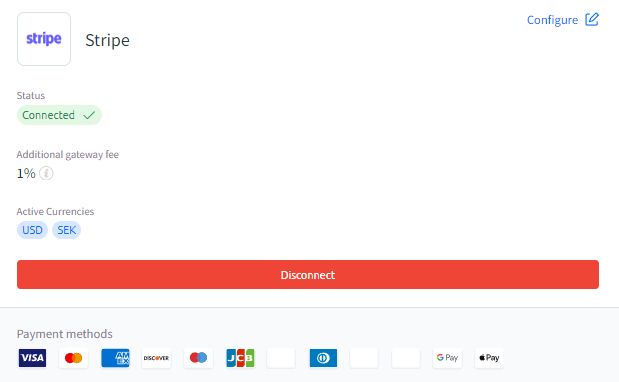
Stripe is a popular payment gateway due to its simplicity. To connect Stripe with Clickfunnels 2.0, follow these steps:
- Log in to your Clickfunnels 2.0 account.
- Navigate to the Account Settings menu.
- Select Payment Gateways from the list.
- Click on the Add New Payment Gateway button.
- Choose Stripe from the list of available gateways.
- Click on Connect Stripe.
- You will be redirected to the Stripe login page.
- Enter your Stripe account credentials.
- Authorize Clickfunnels 2.0 to access your Stripe account.
- Once authorized, you will be redirected back to Clickfunnels 2.0.
Your Stripe account is now connected to Clickfunnels 2.0. You can start accepting payments immediately.
Setting Up Paypal
PayPal is another widely used payment gateway. Setting it up in Clickfunnels 2.0 is simple:
- Log in to your Clickfunnels 2.0 account.
- Go to the Account Settings menu.
- Click on Payment Gateways.
- Click on the Add New Payment Gateway button.
- Select PayPal from the list.
- Click on Connect PayPal.
- You will be redirected to the PayPal login page.
- Enter your PayPal account details.
- Authorize Clickfunnels 2.0 to access your PayPal account.
- After authorization, you will be redirected back to Clickfunnels 2.0.
Your PayPal account is now connected to Clickfunnels 2.0. You can start processing payments right away.

Credit: m.youtube.com
Email Marketing
Email marketing is a powerful tool for any online business. With Clickfunnels 2.0, you can easily create and automate email campaigns. This ensures your audience receives timely and relevant messages. Let’s explore how to use Clickfunnels 2.0 for email marketing.
Creating Email Campaigns
Creating email campaigns in Clickfunnels 2.0 is simple. Follow these steps to get started:
- Log in to your Clickfunnels 2.0 account.
- Navigate to the Email Marketing section.
- Select Create New Campaign.
- Choose a template that suits your needs.
- Customize the email content and design.
- Set your target audience and segmentation.
- Schedule the campaign for the best time.
Clickfunnels 2.0 offers a variety of templates. These templates are designed to capture attention. You can also track the performance of your campaigns. Use A/B testing to find the most effective strategies.
Automating Follow-ups
Automating follow-ups can save you time and boost engagement. Clickfunnels 2.0 makes this easy with its automation features:
- Navigate to the Automation tab.
- Click on Create New Automation.
- Choose a trigger event (e.g., email opened).
- Select the follow-up action (e.g., send another email).
- Customize the follow-up email content.
- Set the delay time between the trigger and follow-up.
- Activate the automation sequence.
Automated follow-ups ensure your audience stays engaged. They also help in nurturing leads and converting them into customers. You can set multiple follow-ups based on different triggers. This ensures every action taken by a user leads to a meaningful response.
Email marketing in Clickfunnels 2.0 is efficient and effective. By creating targeted campaigns and automating follow-ups, you can boost your business growth.
Analyzing Performance
Analyzing performance is crucial for the success of your funnels. With Clickfunnels 2.0, you have tools to measure and understand your funnel’s effectiveness. This helps you make data-driven decisions and improve your marketing strategies.
Understanding Analytics
Clickfunnels 2.0 provides a detailed analytics dashboard. This dashboard shows key metrics like conversion rates, click-through rates, and page views. You can track these metrics to see how well your funnel performs.
- Conversion Rates: The percentage of visitors who complete the desired action.
- Click-Through Rates: The percentage of visitors who click on your call-to-action.
- Page Views: The number of times a page is viewed.
Use these metrics to identify which parts of your funnel need improvement.
A/b Testing
A/B testing allows you to compare two versions of a page. This helps you determine which version performs better. In Clickfunnels 2.0, you can easily set up A/B tests.
- Create two versions of your page.
- Split your traffic equally between the two versions.
- Analyze the results to see which version converts better.
Focus on testing one element at a time, such as the headline or call-to-action. This ensures you know which change made the difference.
| Element to Test | Examples |
|---|---|
| Headline | Change the wording or style. |
| Call-to-Action | Test different buttons or texts. |
| Images | Use different images or graphics. |
Regular A/B testing helps you continually optimize your funnels.
Advanced Features
Clickfunnels 2.0 offers advanced features that can skyrocket your business. These features help in scaling, managing, and automating your online sales. Let’s dive deep into some of these powerful tools.
Membership Sites
Creating membership sites within Clickfunnels 2.0 is straightforward. These sites allow you to deliver exclusive content to your members.
- Build secure, members-only areas with ease.
- Deliver courses, training, and exclusive content.
- Automate membership sign-ups and cancellations.
To create a membership site:
- Navigate to the ‘Funnels’ tab.
- Select ‘Membership Funnel’.
- Customize the membership area using drag-and-drop tools.
- Add your content and set access permissions.
Membership sites keep your audience engaged and loyal. They also provide a recurring revenue stream.
Affiliate Management
Clickfunnels 2.0 includes an Affiliate Management system. This system allows you to create and manage an army of affiliates.
- Track affiliate sales and commissions.
- Automate payout processes.
- Offer unique affiliate links and promotional materials.
Setting up affiliate management involves a few steps:
- Go to the ‘Affiliate’ section in your dashboard.
- Create an affiliate program.
- Generate unique affiliate links.
- Invite people to join your affiliate program.
Affiliates can significantly increase your reach and sales. They promote your products in exchange for commissions.
Troubleshooting
Troubleshooting in Clickfunnels 2.0 can save you time and frustration. This section covers common issues and how to get help from customer support.
Common Issues
Users often face common issues while using Clickfunnels 2.0. Here are some frequent problems and solutions:
- Page Not Loading: Clear your browser cache and cookies.
- Form Submission Errors: Check for required fields and correct formats.
- Integration Failures: Ensure API keys and credentials are correct.
- Slow Page Speed: Optimize images and reduce script usage.
Customer Support
If the problem persists, contact Clickfunnels 2.0 customer support. They provide various support options:
| Support Type | Details |
|---|---|
| Live Chat | Available 24/7 for immediate help. |
| Email Support | Response within 24 hours for detailed queries. |
| Help Center | Access articles and tutorials anytime. |
Follow these steps to get the best support:
- Log into your Clickfunnels 2.0 account.
- Navigate to the Help Center or Contact Us page.
- Select the type of support you need.
- Provide detailed information about your issue.
- Wait for a response from the support team.
By following these guidelines, you can resolve issues quickly and efficiently.

Credit: kimdoyal.com
Frequently Asked Questions
What Is Clickfunnels 2.0?
Clickfunnels 2. 0 is a comprehensive sales funnel builder that helps businesses create landing pages, sales pages, and marketing funnels.
How To Create A Funnel In Clickfunnels 2.0?
To create a funnel, navigate to the dashboard, click “Build Funnel,” and follow the step-by-step wizard.
Can I Integrate Email Marketing With Clickfunnels 2.0?
Yes, you can integrate popular email marketing services like MailChimp, ActiveCampaign, and more directly into Clickfunnels 2. 0.
Is Clickfunnels 2.0 Beginner-friendly?
Absolutely. Clickfunnels 2. 0 is designed with an intuitive interface, making it easy for beginners to create effective funnels.
How Does Clickfunnels 2.0 Improve Conversions?
Clickfunnels 2. 0 offers optimized templates, A/B testing, and analytics to help you improve your conversion rates.
What Are The Key Features Of Clickfunnels 2.0?
Key features include funnel builder, landing page editor, A/B testing, email integrations, and detailed analytics.
How To Track Performance In Clickfunnels 2.0?
Use the built-in analytics dashboard to track metrics like visitor count, conversion rates, and sales performance.
Is There Customer Support For Clickfunnels 2.0?
Yes, Clickfunnels 2. 0 provides 24/7 customer support via live chat, email, and a comprehensive knowledge base.
Conclusion
Mastering Clickfunnels 2. 0 can transform your online business. Follow the steps outlined to create high-converting funnels. With practice, your skills will improve, leading to better results. Start today and watch your sales grow. Remember, consistency is key to success with Clickfunnels 2.
0. Happy funnel building!




