ActiveCampaign is a powerful email marketing tool. It helps businesses connect with their audience effectively.
Are you struggling to manage your email marketing campaigns? ActiveCampaign can be a solution for you. It offers a range of features that make email marketing easy and efficient. With ActiveCampaign, you can automate your emails, track customer behavior, and personalize your messages.
This tool saves you time and helps you engage with your audience in a meaningful way. Whether you are a small business or a large enterprise, ActiveCampaign can adapt to your needs. In this guide, we will explore how to use ActiveCampaign to its full potential. Let’s dive in and discover the steps to make the most of this tool.
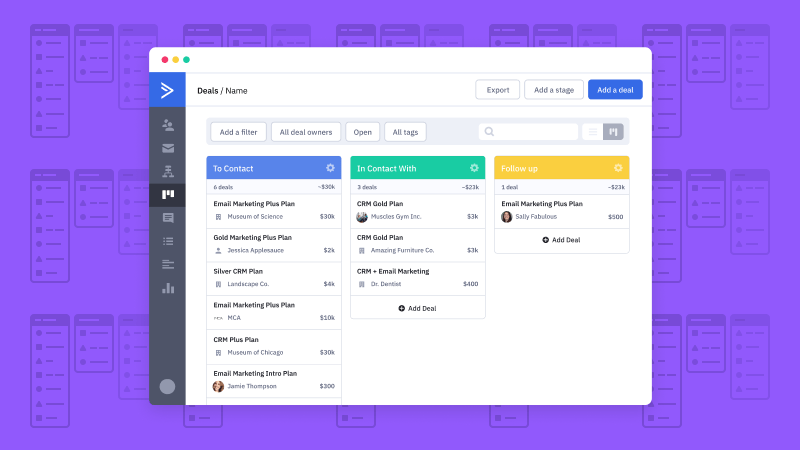
Credit: www.activecampaign.com
Getting Started
Welcome to the world of ActiveCampaign! If you’re new to this platform, you’re in the right place. Getting started with ActiveCampaign is a breeze, and we’re here to guide you through each step. Whether you’re looking to manage your emails, automate your marketing, or just need a solid CRM, ActiveCampaign has got you covered. Let’s dive in and get you set up!
Creating An Account
First things first, you need to create an account. Here’s how you can do it:
- Visit the ActiveCampaign website.
- Click on the Sign Up button located at the top-right corner of the homepage.
- Enter your email address and create a password. Make sure to use a strong password to keep your account secure.
- Click on Create Account to proceed.
Once you’ve created your account, you’ll receive a confirmation email. Click the link in the email to verify your account. And voila, you’re in!
Setting Up Your Profile
Now that you have an account, it’s time to set up your profile. This helps personalize your experience and makes it easier for others to recognize you.
- Log in to your account: Use the email and password you created earlier.
- Navigate to your profile settings: Click on your avatar or initials at the top-right corner and select My Profile.
- Fill in your details: Here, you can add your name, contact information, and a profile picture. A picture adds a personal touch!
- Customize your settings: Adjust your notification preferences and other settings to suit your needs.
- Save your changes: Don’t forget to hit the Save button to ensure all your information is updated.
Setting up your profile is not just about adding your details; it’s about making the platform work for you. Remember, the more information you provide, the more personalized your experience will be. Plus, it’s always nice to put a face to the name, right?
With your account created and profile set up, you’re now ready to explore the many features ActiveCampaign has to offer. Stay tuned for more tips and tricks in our next section!

Credit: www.powerapps911.com
Navigating The Dashboard
Explore the ActiveCampaign dashboard to manage campaigns efficiently. Find key features like automation, email templates, and contact management. Easily track performance metrics and optimize your marketing efforts.
Navigating the ActiveCampaign dashboard is crucial for using the platform effectively. This section will guide you on how to get familiar with the dashboard, customize your workspace, and understand its features.Overview Of Features
The ActiveCampaign dashboard offers a range of features for your marketing needs. You can access your contacts, campaigns, automations, and reports from the main menu. The dashboard provides quick insights into your recent activities and performance metrics. It helps you track your email campaigns, see open rates, and monitor engagement.Customizing Your Workspace
Customizing your workspace can make your experience more efficient. You can rearrange widgets on the dashboard to prioritize important data. Set up quick links to access frequently used tools. Adjust the layout to suit your workflow and preferences. This helps you stay organized and focused on your tasks.Building Email Campaigns
Building email campaigns in ActiveCampaign is straightforward and effective. With the right steps, you can reach your audience efficiently. Let’s break down the process into simple stages. Follow these steps to create and design your email campaigns.
Creating A New Campaign
First, log into your ActiveCampaign account. Next, navigate to the “Campaigns” section. Click on the “Create a Campaign” button. Choose the type of campaign you want. Options include standard, automated, or split testing. Give your campaign a unique name. This helps you identify it later. Choose your email list. You can select one or multiple lists. Click “Next” to proceed to the design phase.
Designing Your Email
Now, it’s time to design your email. ActiveCampaign offers various templates. Choose a template that fits your campaign’s goal. You can also start from scratch. Use the drag-and-drop editor to add elements. These include text, images, and buttons. Make sure your design is clean and easy to read. Add a compelling subject line. This encourages recipients to open your email. Personalize your email with dynamic content. This makes your message more relevant. Finally, preview your email. Ensure it looks good on both desktop and mobile devices. Click “Next” to review your settings. Once everything looks good, send or schedule your email.
Credit: www.activecampaign.com
Managing Contacts
Managing your contacts in ActiveCampaign is like organizing your closet. You want everything to be easy to find and accessible. Whether you are starting fresh or migrating from another platform, understanding how to handle your contacts is crucial. Let’s break it down into simple steps. We’ll cover how to import contacts and segment your audience so you can communicate effectively.
Importing Contacts
First things first, you need to get your contacts into ActiveCampaign. Don’t worry; it’s easier than it sounds. Here’s a step-by-step guide to help you:
- Prepare Your Data: Make sure your contact list is in a CSV or TXT file. Include all necessary columns like names, emails, and any other data you have.
- Access Your Account: Log in to your ActiveCampaign account. If you don’t have one, you can sign up for a free trial to get started.
- Navigate to Contacts: Go to the ‘Contacts’ section in the dashboard. You’ll see an option to ‘Import Contacts’. Click on it.
- Upload Your File: Choose the file you prepared and upload it. Follow the prompts to map your data fields correctly.
- Review & Import: Double-check your data mapping to ensure everything looks good. Then, click ‘Import Now’. Voilà! Your contacts are now in ActiveCampaign.
Segmenting Your Audience
Once your contacts are in, it’s time to segment them. This step is crucial because it allows you to send targeted messages to different groups. Here’s how you can segment your audience:
- Create Segments: Go to the ‘Contacts’ section and click on ‘Segments’. Here, you can create a new segment based on various conditions like location, purchase history, or engagement level.
- Use Tags: Tags are a powerful way to categorize your contacts. You can tag contacts during import or manually add tags later. For example, tag all your VIP customers or newsletter subscribers.
- Custom Fields: Use custom fields to store additional information about your contacts. This data can help you create more personalized segments.
- Automation: Set up automation to update segments automatically. For instance, you can create an automation that moves contacts to a different segment after they make a purchase.
Segmenting your audience makes your marketing efforts more effective and helps you build stronger relationships with your contacts. Remember, the better you know your audience, the better you can serve them.
Analyzing Campaign Performance
Understanding how well your campaigns perform is crucial. ActiveCampaign offers robust tools for this. Analyzing campaign performance helps you understand what works. It also shows what needs improvement. This section guides you through the process. We will cover viewing reports and interpreting data.
Viewing Reports
ActiveCampaign makes it easy to view reports. First, navigate to the “Reports” tab on the dashboard. Here, you see an overview of your campaigns. Click on a campaign name to get detailed insights. The report shows key metrics like open rates and click-through rates. You can also see bounce rates and unsubscribe rates.
Use filters to narrow down the data. Select specific time frames or segments. This helps you focus on particular areas. Exporting reports is also simple. Click the “Export” button for a CSV or PDF file. This allows for further analysis outside ActiveCampaign.
Interpreting Data
Interpreting data is the next step. Look at the open rates first. A high open rate means your subject lines are effective. Low open rates suggest room for improvement. Click-through rates show engagement with your content. High click-through rates are a positive sign.
Analyze bounce rates to check email delivery issues. High bounce rates may mean problems with your email list. Unsubscribe rates indicate the relevance of your content. High unsubscribe rates may signal a need to revise your messaging.
Compare your data against industry benchmarks. This helps you understand your performance better. Focus on areas that need improvement. Small changes can make a big difference.
Frequently Asked Questions
Is Activecampaign Easy To Learn?
Yes, ActiveCampaign is easy to learn. The platform offers user-friendly features, tutorials, and responsive customer support to assist beginners.
What Is The Use Of Activecampaign?
ActiveCampaign is used for email marketing, automation, and CRM. It helps businesses engage customers and drive growth.
What Is Activecampaign Best For?
ActiveCampaign excels in email marketing automation, CRM integration, and lead management, helping businesses improve customer engagement and sales.
How To Use Active Campaigns For Email Marketing?
Use ActiveCampaign to create email lists, design engaging emails, and automate campaigns. Track performance using analytics.
How Do I Create An Email Campaign In Activecampaign?
Creating an email campaign is simple. Go to “Campaigns,” click “Create a campaign,” and follow the prompts.
Conclusion
ActiveCampaign is a great tool for email marketing and automation. You can easily set up campaigns and manage contacts. The platform offers many features to help grow your business. With a bit of practice, you can make the most of it.
Start small, learn the basics, and build from there. Soon, you will see improvements in your marketing efforts. Give it a try and watch your business thrive.