

To cancel Clickfunnels 2.0, log in to your account, go to the Account Settings, and follow the cancellation instructions. Canceling your Clickfunnels 2.0 subscription is straightforward and user-friendly.
This platform offers a range of tools for building and optimizing sales funnels, but there might come a time when you need to discontinue your service. Whether you’ve found an alternative or no longer need its features, the cancellation process is simple.
By accessing your account settings, you can easily navigate through the steps to terminate your subscription. Knowing how to cancel ensures you manage your subscriptions effectively and avoid unnecessary charges. This guide will help you understand the process clearly, ensuring a smooth experience.
Preparing For Cancellation
Deciding to cancel your ClickFunnels 2.0 account involves a few critical steps. Proper preparation ensures a smooth transition. This guide will help you review your account and backup your data efficiently. Let’s dive in!
Review Your Account
Before you cancel, take a moment to review your account. Look at your funnels, pages, and integrations. Identify what you need to keep. Here’s a quick checklist:
- Check your active funnels
- Review your customer data
- Note any third-party integrations
Make sure you have a clear understanding of what your ClickFunnels 2.0 account holds. This will help you decide what to save and what to discard.
Backup Your Data
Backing up your data is crucial before you cancel ClickFunnels 2.0. Data loss can be costly. Follow these steps to ensure you have everything you need:
- Export your funnel steps and pages
- Download customer information
- Save any custom scripts or codes
ClickFunnels 2.0 offers export options for most data. Use these features to create backups. Store these backups securely on your computer or cloud storage.
To export your funnels, go to the funnel settings. Click on the export option. Save the file to your preferred location.
| Data Type | Export Method | Storage Option |
|---|---|---|
| Funnel Steps | Export as .csv | Computer/Cloud |
| Customer Info | Download as .xlsx | Computer/Cloud |
| Custom Scripts | Copy to a .txt file | Computer/Cloud |
Ensure that you have backed up all essential data. This will prevent any disruptions to your business operations after canceling ClickFunnels 2.0.

Credit: supplygem.com
Cancellation Process
Canceling your Clickfunnels 2.0 account might seem daunting. Follow these steps to ensure a smooth cancellation process. This guide will take you through accessing your account settings and navigating to the cancellation page.
Accessing Your Account Settings
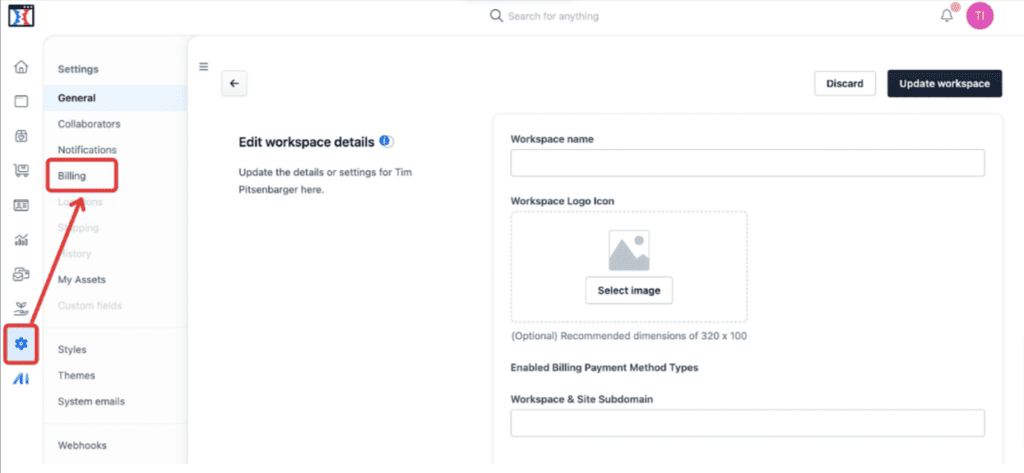
First, log into your Clickfunnels 2.0 account. Use your registered email and password. Once logged in, locate the user profile icon. This icon is typically at the top right corner of the dashboard.
Click on the profile icon to reveal a drop-down menu. From this menu, select the Account Settings option. This will take you to a new page where you can manage your account details.
Navigating To The Cancellation Page
On the Account Settings page, find the Billing section. This section contains your payment details and subscription information. Scroll down to the bottom of the Billing section.
Here, you will see a link or button labeled Cancel Account. Click on this link to proceed. A confirmation window will pop up, asking you to confirm your decision. Ensure you read any messages or prompts carefully.
| Step | Action |
|---|---|
| 1 | Log into your account |
| 2 | Click on the user profile icon |
| 3 | Select ‘Account Settings’ |
| 4 | Go to the ‘Billing’ section |
| 5 | Click ‘Cancel Account’ |
After confirming, you will receive an email. This email will acknowledge your cancellation request. Ensure you check your inbox for this confirmation.
Completing The Cancellation
Canceling your Clickfunnels 2.0 subscription is a straightforward process. Follow these steps to ensure it’s done properly. Make sure you understand each step. This guide will help you navigate the process easily.
Confirming Your Decision
Before you proceed, ensure you want to cancel. Reflect on why you want to end your subscription. Is there an issue that can be resolved? If not, let’s move forward.
To confirm your decision:
- Log into your Clickfunnels 2.0 account.
- Go to the Billing section.
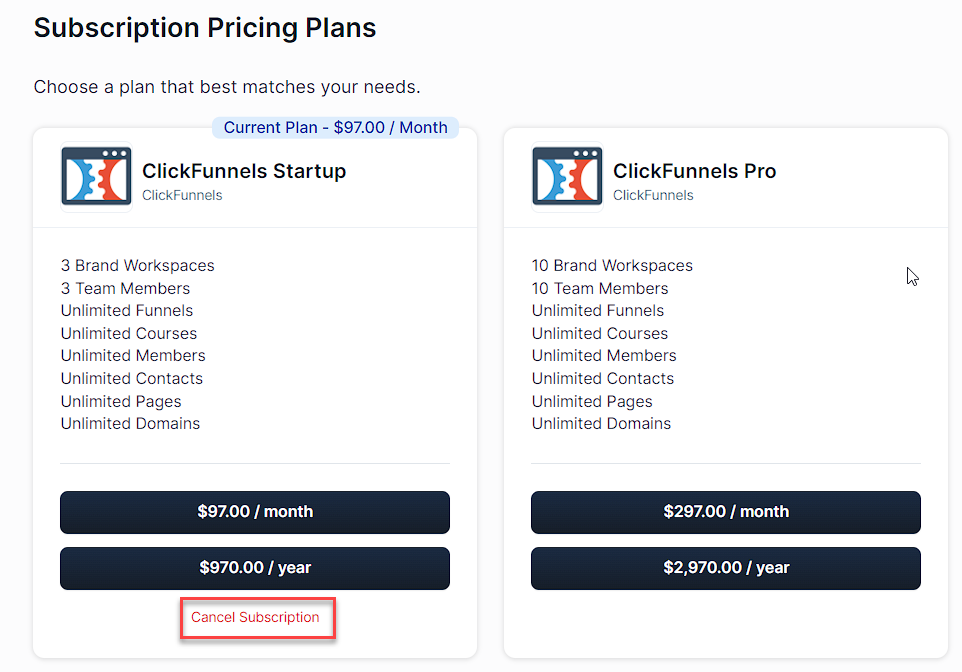
- Select Cancel Subscription.
You may be asked to provide feedback. This helps the company improve. Be honest and clear in your response.
Receiving Confirmation
After you submit your cancellation, you should receive a confirmation email. This email is important. It verifies that your subscription has been canceled.
Check your inbox and spam folder for this email. If you do not receive it:
- Contact Clickfunnels 2.0 support.
- Provide your account details.
Keep this email for your records. It’s proof of your cancellation. If there are any issues, you can refer to this email.
By following these steps, you can complete your Clickfunnels 2.0 cancellation smoothly. Ensure you receive and save your confirmation email.

Credit: support.clickfunnels.com
Post-cancellation Steps
After you cancel your Clickfunnels 2.0 subscription, you must complete a few important tasks. These tasks ensure that your data and integrations are properly managed.
Deleting Stored Data
First, delete your stored data. This helps protect your information.
- Log in to your Clickfunnels account.
- Navigate to the Account Settings.
- Select Data Management.
- Choose the data you want to delete.
- Click Delete and confirm your choice.
Ensure you have a backup before deleting. Once deleted, data cannot be recovered.
Revoking Integrations
Next, revoke any integrations linked to your Clickfunnels account.
- Go to Account Settings.
- Click on Integrations.
- Identify all active integrations.
- Select each integration and click Revoke Access.
Revoking integrations prevents unauthorized access to your data. This step is crucial for maintaining security.
These steps ensure your data and integrations are managed correctly after cancellation.
Common Issues And Solutions
Cancelling ClickFunnels 2.0 can sometimes be tricky. Users often face common issues during the cancellation process. This section aims to address these problems and provide easy solutions. By following these steps, you can ensure a smooth cancellation experience.
Troubleshooting Access Issues
One common problem is access issues. Users might find themselves unable to log in. This can be due to forgotten passwords or system glitches.
To fix this, try the following steps:
- Reset your password through the ‘Forgot Password’ link.
- Clear your browser’s cache and cookies.
- Use a different browser or device.
If these steps don’t work, you might need to contact support.
Contacting Support
If you cannot resolve the issue on your own, contacting support is the best option. Follow these steps to get help:
- Go to the ClickFunnels 2.0 Support Page.
- Submit a support ticket with detailed information.
- Wait for a response from the support team.
You can also use the live chat option for immediate assistance. The support team will guide you through the cancellation process.
Here is a quick overview of the contact methods:
| Method | Details |
|---|---|
| support@clickfunnels.com | |
| Live Chat | Available on the support page |
| Support Ticket | Submit via the support page |
By following these guidelines, you can efficiently address common issues and ensure a smooth cancellation process for ClickFunnels 2.0.
Alternative Solutions
While you may wish to cancel your ClickFunnels 2.0 subscription, there are other paths you can explore. Before making a final decision, consider alternative solutions that might better fit your needs. Below, we discuss two of these options in detail.
Downgrading Your Plan
If the cost is a concern, you may benefit from downgrading your ClickFunnels plan. By choosing a lower-tier subscription, you can still enjoy essential features without breaking the bank.
Here is a simple comparison of features between plans:
| Feature | Basic Plan | Pro Plan |
|---|---|---|
| Funnel Templates | 10 | Unlimited |
| Email Marketing | Limited | Advanced |
| Support | Standard | Priority |
Exploring Other Platforms
Sometimes, a different platform might better suit your requirements. Here are some ClickFunnels alternatives:
- Leadpages: Known for its easy-to-use interface and robust features.
- Kartra: Offers comprehensive marketing automation tools.
- Builderall: Provides an all-in-one digital marketing platform.
Each of these platforms offers unique advantages. Explore these options to find one that aligns with your business goals.
Credit: support.myclickfunnels.com
Frequently Asked Questions
How Do I Cancel Clickfunnels 2.0?
Log in, go to account settings, select billing, and click “Cancel Account. “
Is There A Cancellation Fee For Clickfunnels 2.0?
No, Clickfunnels 2. 0 does not charge a cancellation fee.
Can I Pause My Clickfunnels 2.0 Subscription?
No, Clickfunnels 2. 0 does not offer a subscription pause option.
Will I Lose Data After Cancellation?
Yes, all data and funnels will be deleted upon cancellation.
How Long Does Cancellation Take?
Cancellation is immediate once you confirm the process in your account settings.
Can I Get A Refund After Cancellation?
Refunds are not typically provided unless specified in their refund policy.
What Happens To My Active Funnels?
Active funnels will be deleted and inaccessible after cancellation.
Can I Reactivate My Clickfunnels 2.0 Account?
Yes, you can reactivate your account by contacting support and re-subscribing.
Conclusion
Canceling Clickfunnels 2. 0 is simple when you follow the right steps. Ensure you review your subscription details. Follow the outlined process carefully to avoid any issues. Always double-check for confirmation of cancellation. With this guide, you can easily manage your Clickfunnels 2.
0 subscription. Enjoy a seamless experience with your online tools.




