

Moving your domain from Namecheap to Hostinger is a simple process, but some details can confuse beginners. If you want your website to work perfectly on Hostinger, you need to point your domain’s DNS correctly. Let’s break down the steps and highlight a few key mistakes you should avoid.
What Does “point Domain” Mean?
Pointing a domain means connecting your domain name (like mysite.com) with your web hosting account. This lets visitors reach your website hosted at Hostinger. You do this by changing your DNS settings at Namecheap.
| Term | Meaning |
|---|---|
| Domain | Your website address |
| DNS | System that connects domain to server |
| Nameservers | Special DNS records from your host |
Step-by-step Guide To Point Domain
1. Log In To Namecheap
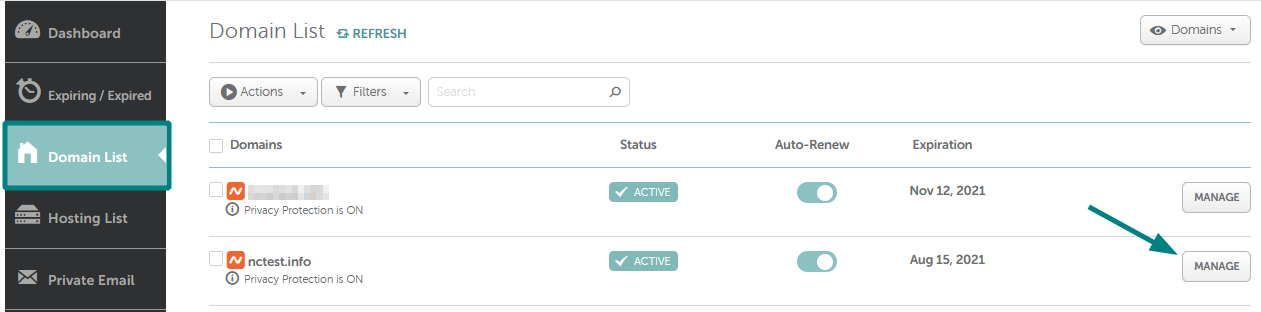
Go to your Namecheap account. Find the domain you want to connect.
2. Access Domain Settings
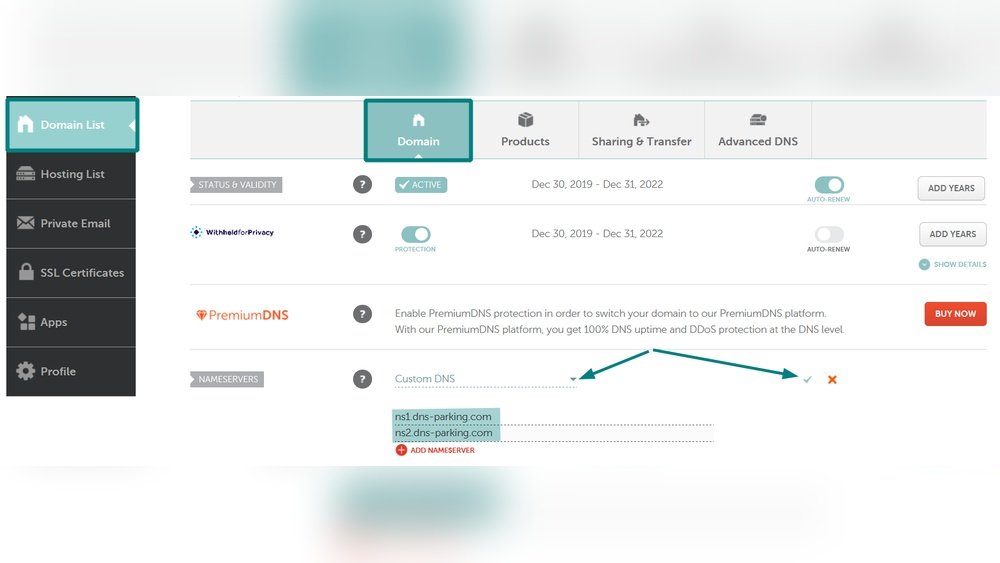
Click “Manage” next to your domain. Scroll down to the Nameservers section.
3. Get Hostinger Nameservers
Hostinger gives you two nameservers. They look like this:
- Ns1.dns-parking.com
- Ns2.dns-parking.com
You’ll find them in your Hostinger dashboard under “Hosting -> Manage -> Details. ”
4. Update Nameservers At Namecheap
In Namecheap, set “Custom DNS” and paste Hostinger’s nameservers. Save changes.
5. Wait For Dns Propagation
It usually takes 1–24 hours for DNS changes to update. Sometimes, it can take up to 48 hours.
| Step | Approximate Time |
|---|---|
| Change nameservers | 2 minutes |
| DNS propagation | 1–48 hours |

Credit: www.youtube.com
Common Mistakes To Avoid
- Forgetting to copy both nameservers.
- Not saving changes after updating DNS.
- Using old Hostinger nameservers (always check for the latest).
- Changing DNS too often—this can delay propagation.
Tip: If your website doesn’t work after 24 hours, clear your browser cache or check DNS status on WhatsMyDNS.net.
Why Pointing Matters
If you skip this step, your website will not load from Hostinger. Visitors might see errors or old content. Proper DNS setup ensures your site is secure, fast, and reliable.
| Host | DNS Setup Required? | Risk if Missed |
|---|---|---|
| Hostinger | Yes | Site won’t work |
| Namecheap Hosting | No (if you use their hosting) | Site stays on old host |
Credit: www.namecheap.com
Frequently Asked Questions
How Long Does Dns Propagation Take?
It usually takes 1–24 hours. Sometimes, it may need up to 48 hours.
Do I Need To Transfer My Domain To Hostinger?
No. Pointing the domain is enough. You don’t need to transfer it unless you want Hostinger to manage it.
Will My Website Go Offline During The Process?
If DNS is set correctly, downtime is rare. However, mistakes can cause temporary outages.
What Are Hostinger’s Current Nameservers?
Check your Hostinger dashboard. The most common are ns1.dns-parking.com and ns2.dns-parking.com.
Can I Point Multiple Domains To Hostinger?
Yes. Just repeat these steps for each domain you own.




