

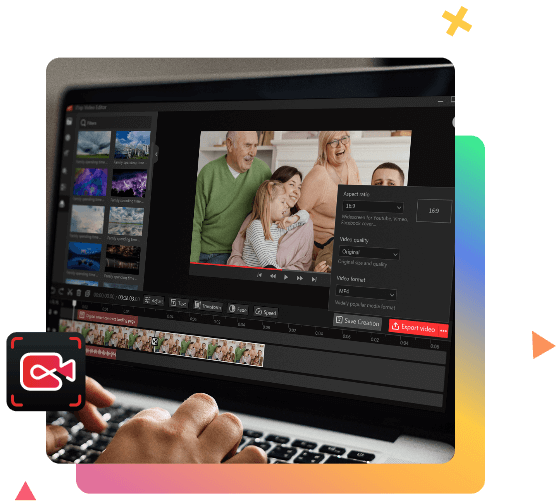
Editing videos can be fun and rewarding. Itop Video Editor makes it easy for everyone.
Video editing tools come in many shapes and sizes. Itop Video Editor stands out for its user-friendly interface and powerful features. Whether you’re a beginner or a pro, this tool helps you create stunning videos without the hassle. It offers a range of editing options, including trimming, cropping, and adding effects.
Plus, it supports various formats, making it versatile for different projects. With Itop Video Editor, you can turn your raw footage into polished content effortlessly. Dive in to explore how this editor can transform your video editing experience!
Credit: www.send2press.com
Introduction To Itop Video Editor
Welcome to the world of video editing made easy with Itop Video Editor! If you are new to video editing or just looking for a user-friendly tool, Itop Video Editor might be your new best friend. This software is designed to simplify video editing for everyone, even if you’re not a tech wizard. Ready to dive in? Let’s explore what makes Itop Video Editor a standout choice!
What Is Itop Video Editor?
Itop Video Editor is a powerful yet easy-to-use video editing software. It’s perfect for beginners and those who want to create stunning videos without a steep learning curve. Whether you’re editing videos for social media, creating a family video, or working on a school project, Itop Video Editor provides all the necessary tools to make your videos shine.
Key Features
Let’s take a closer look at the key features that make Itop Video Editor a favorite among users:
- User-Friendly Interface: The software has a simple and intuitive interface, making it easy to navigate even for first-time users.
- Rich Video Effects: Choose from a variety of filters, transitions, and effects to enhance your videos.
- Easy Editing: Trim, cut, split, merge, and rotate your videos with just a few clicks.
- Audio Editing: Add background music, voiceovers, and sound effects to bring your videos to life.
- Text and Titles: Insert titles, subtitles, and text to your videos to convey your message clearly.
- Export Options: Export your videos in various formats suitable for different devices and platforms.
Itop Video Editor combines simplicity with powerful features, making it an excellent choice for anyone looking to create professional-looking videos without breaking a sweat. So why wait? Give Itop Video Editor a try and start creating your video masterpieces today!
User-friendly Interface
iTop Video Editor stands out with its user-friendly interface. It’s designed to make video editing easy for everyone. You do not need to be a tech expert to create stunning videos. This section will explore two key parts of its interface.
Navigating The Dashboard
When you open iTop Video Editor, the dashboard greets you. It is clean and well-organized. The main tools are easy to find. Icons and labels guide you through each function. This layout helps you start your project quickly. You can see everything at a glance. No need to dig through menus.
Customizing Your Workspace
iTop Video Editor lets you customize your workspace. You can adjust panels and toolbars to suit your needs. Drag and drop elements where you want them. This flexibility saves time. It also makes your editing process smoother. You can focus on your creativity.
Powerful Editing Tools
Itop Video Editor offers a suite of powerful editing tools. These tools make video editing easy and efficient. Whether you are a beginner or a pro, you will find these tools helpful.
Trimming And Cutting
Trimming and cutting are essential tasks in video editing. Itop Video Editor simplifies these tasks. You can easily remove unwanted parts of your video. This helps in creating a smooth flow in your videos. Precise trimming ensures your video is just the right length. Simple drag-and-drop tools make the process quick.
Adding Effects And Transitions
Effects and transitions add flair to your videos. Itop Video Editor provides a variety of effects. These effects enhance the visual appeal of your videos. You can easily apply filters and adjust colors. Transitions help in smooth scene changes. They make your video look professional. Choose from a wide range of transition styles. Apply them with a single click.
Exporting And Sharing
Exporting and sharing your videos is a crucial part of video editing. With Itop Video Editor, these tasks become seamless and efficient. This section will guide you through the options available for exporting and sharing your edited videos.
Output Formats
Itop Video Editor supports a variety of output formats. This flexibility ensures that your video can be viewed on any device. Popular formats include MP4, AVI, and MOV. You can also export in high-definition resolutions. This guarantees that your video looks great on any screen size. Adjusting the output settings is simple. You can select the format and resolution that best suits your needs.
Sharing Options
Sharing your videos directly from Itop Video Editor is easy. The software offers direct upload options to popular platforms. You can upload to YouTube, Vimeo, and Facebook with a few clicks. This saves you time and effort. Additionally, you can save your video to your computer. This allows you to share it via email or other methods. The sharing options are designed to be user-friendly. They make it easy for you to distribute your content widely.
Tips And Tricks
Using iTop Video Editor can be much easier with some useful tips and tricks. These can help you save time and create amazing videos. Here are some tips to get the most out of your video editing experience.
Keyboard Shortcuts
Keyboard shortcuts can speed up your editing process. Use common shortcuts to make your workflow smoother. For example, press “Ctrl+Z” to undo your last action. Press “Ctrl+S” often to save your work. This avoids losing progress. To cut a clip, use “Ctrl+X”. Copying is easy with “Ctrl+C”, and pasting with “Ctrl+V”. These shortcuts make editing faster and more efficient.
Optimizing Performance
Optimizing performance ensures your editor runs smoothly. Close other programs to free up memory. Adjust the playback resolution to a lower setting. This helps the editor run faster. Update your graphics card drivers regularly. This improves compatibility and performance. Finally, keep your software updated. This ensures you have the latest features and fixes.

Credit: www.audiomentor.com

Credit: www.audiomentor.com
Frequently Asked Questions
What Is Itop Video Editor?
ITop Video Editor is a user-friendly tool for editing videos. It offers features like trimming, cutting, and adding effects.
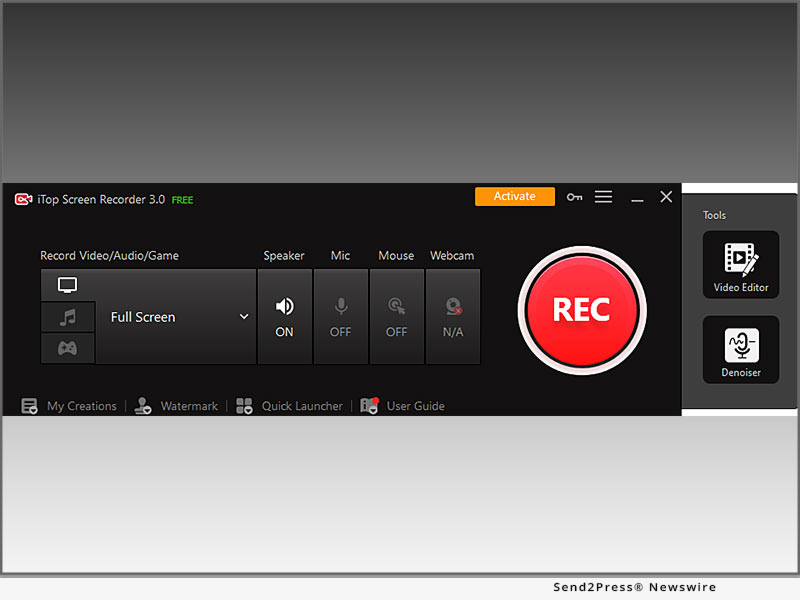
Is Itop Screen Recorder Safe To Use?
Yes, iTop Screen Recorder is safe to use. It has positive user reviews and no major security issues reported.
Which Is The Best Video Editor For Free?
The best free video editor is DaVinci Resolve. It offers professional-grade features, user-friendly interface, and regular updates.
What Do Most Youtubers Use To Edit Their Videos?
Most YouTubers use Adobe Premiere Pro, Final Cut Pro, and iMovie for video editing. These tools offer advanced features and user-friendly interfaces.
What Are The Key Features Of Itop Video Editor?
Itop Video Editor offers features like video trimming, adding effects, transitions, and audio editing.
Conclusion
Itop Video Editor offers a user-friendly experience for all skill levels. Its intuitive design makes video editing simple and fun. You can create professional-looking videos with ease. The variety of features allows for creative expression. Try Itop Video Editor to enhance your video projects effortlessly.
It’s a great tool for beginners and experts alike. Editing videos has never been so accessible. Start your editing journey today and see the difference.




