

ActiveCampaign is a popular marketing automation tool. It helps businesses streamline their marketing efforts.
ActiveCampaign combines email marketing, automation, and CRM tools in one platform. This makes it easier to manage customer relationships and marketing campaigns. By using ActiveCampaign, businesses can create targeted email campaigns, track customer behavior, and automate follow-ups. The platform is user-friendly and designed to help businesses grow.
Whether you’re new to marketing automation or looking to improve your strategies, understanding how ActiveCampaign works can be beneficial. In this blog post, we will explore the key features of ActiveCampaign and how they can help you achieve your marketing goals. Let’s dive in and see what makes ActiveCampaign a valuable tool for marketers.
Introduction To Activecampaign
When we talk about email marketing, ActiveCampaign often comes up as a powerful tool. But what makes it so special? In this section, we will explore the basics of ActiveCampaign, its key features, and why it is a favorite among marketers. Let’s dive in!
What Is Activecampaign?
ActiveCampaign is an all-in-one marketing platform designed to help businesses build meaningful connections with their customers. It combines email marketing, marketing automation, sales automation, and CRM (Customer Relationship Management) tools into a single, easy-to-use platform. Whether you are a small business owner or a large enterprise, ActiveCampaign offers the tools you need to grow your business.
Key Features Overview
ActiveCampaign is packed with features that make marketing simple and effective. Here’s a quick look at some of its key features:
- Email Marketing: Create, send, and track emails effortlessly. Use templates or build your own design.
- Marketing Automation: Automate your marketing tasks, like sending welcome emails or following up with leads.
- CRM Integration: Manage your contacts and sales pipeline within the same platform.
- Segmentation: Organize your contacts into lists and segments for targeted campaigns.
- Analytics and Reporting: Measure the success of your campaigns with detailed reports and analytics.
To give you a better understanding, here’s a table summarizing these features:
| Feature | Description |
|---|---|
| Email Marketing | Create and send emails, track performance |
| Marketing Automation | Automate tasks like follow-ups and welcome emails |
| CRM Integration | Manage contacts and sales in one place |
| Segmentation | Organize contacts for targeted marketing |
| Analytics and Reporting | Detailed reports on campaign performance |
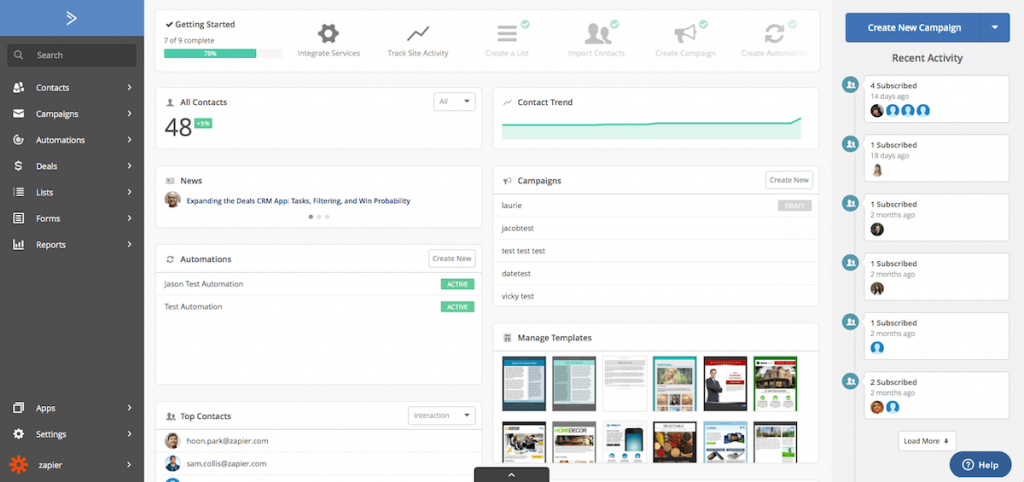
ActiveCampaign is like having a marketing team at your fingertips. It’s designed to make your life easier and your business more successful. Ready to learn more? Stay tuned for the next sections where we delve deeper into each feature!
Credit: zenkit.com
Setting Up Your Account
Setting up your ActiveCampaign account is the first step towards efficient email marketing. This process ensures your campaigns run smoothly from the start. Let’s dive into the essential steps for account creation and initial setup.
Account Creation
Begin by visiting the ActiveCampaign website. Look for the sign-up button on the homepage. Click on it to start the account creation process.
You will need to provide some basic information. Enter your name, email address, and a password. Make sure your password is strong to keep your account secure.
After filling in the details, click on the “Create Account” button. You will receive a confirmation email. Open it and follow the instructions to verify your email address.
Initial Setup Steps
Once your account is created, log in with your credentials. You will be greeted by the setup wizard. This tool helps you configure essential settings.
First, add your company details. This includes your company name, website URL, and physical address. This information is important for compliance with email marketing laws.
Next, connect your email domain. This step ensures your emails come from a professional address. Follow the guided instructions to complete the domain verification process.
Configure your email settings. Choose your default “From” name and email address. These will appear on all outgoing emails.
Set your time zone and language preferences. This ensures your campaigns are scheduled correctly and in your preferred language.
Finally, import your contacts. You can do this by uploading a CSV file or connecting to other platforms. Make sure your contact list is clean and up-to-date.
With these steps complete, your ActiveCampaign account is ready for use. You can now start creating and sending email campaigns with ease.
Creating Campaigns
Creating campaigns in ActiveCampaign is simple and efficient. It helps you connect with your audience through personalized emails and automated workflows. This section will guide you through the process of designing emails and setting up automation workflows.
Designing Emails
ActiveCampaign offers a user-friendly email designer. You can start with a template or build your email from scratch. The drag-and-drop editor makes it easy to add text, images, and buttons. Customize the design to match your brand’s look and feel. Preview your email to see how it looks on different devices. Send a test email to ensure everything is perfect before launching your campaign.
Automation Workflows
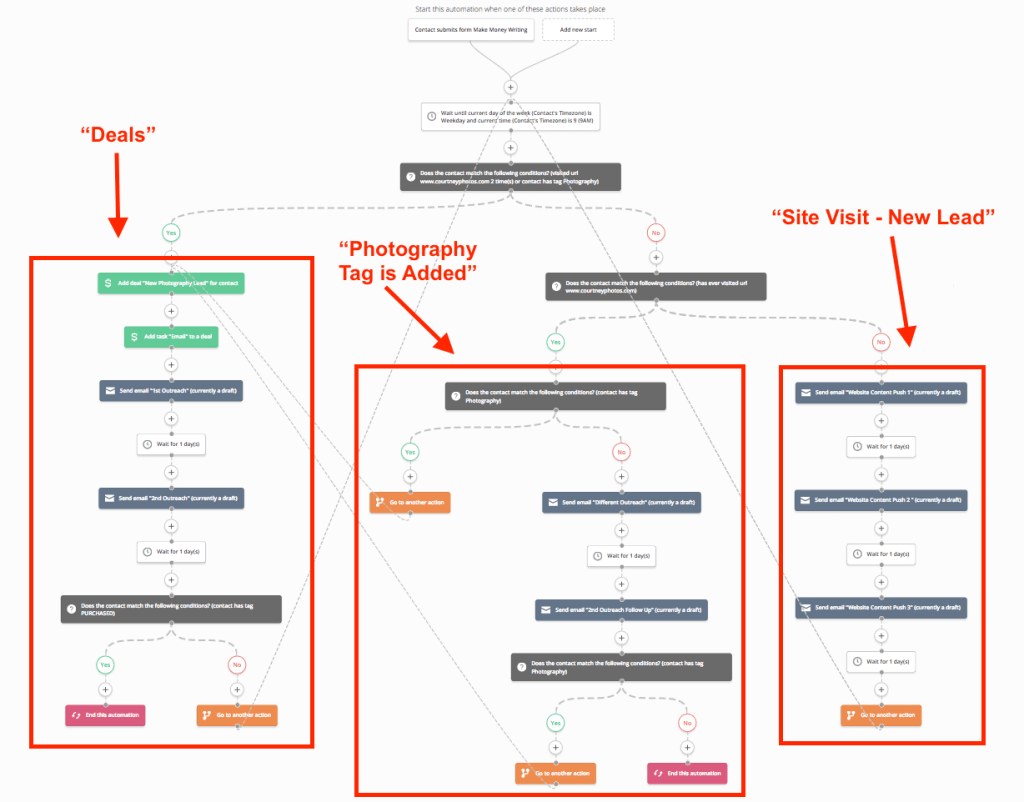
Automation workflows in ActiveCampaign save you time and effort. Set up triggers based on user actions, such as signing up for a newsletter or making a purchase. Create a series of automated emails to nurture leads or welcome new customers. Use the visual workflow builder to map out each step. Add conditions and actions to personalize the user experience. Track the performance of your workflows to optimize for better results.
Managing Contacts
ActiveCampaign is a powerful email marketing and automation tool that can transform the way you manage your contacts. Whether you’re a small business owner or an experienced marketer, ActiveCampaign offers user-friendly features that make organizing and engaging with your contacts a breeze. In this section, we’ll explore some key aspects of managing contacts, including Importing Contacts and Segmentation Strategies. Ready to dive in?
Importing Contacts
Importing contacts into ActiveCampaign is straightforward. You can start by uploading a CSV file, which is a common format for storing contact information. Here’s a step-by-step guide to help you:
- Prepare your CSV file: Ensure that your file includes columns for names, email addresses, and any other relevant information.
- Access the Contacts section: Navigate to the ‘Contacts’ tab in ActiveCampaign’s dashboard.
- Upload your file: Click on ‘Import’ and select your CSV file. The platform will guide you through mapping your file’s columns to the corresponding fields in ActiveCampaign.
- Review and finalize: Double-check the mapped fields and click ‘Import’. Your contacts will be added to your ActiveCampaign account.
By following these simple steps, you can quickly import and organize your contacts, setting the stage for effective email marketing campaigns.
Segmentation Strategies
One of ActiveCampaign’s standout features is its ability to segment your contacts. Why is segmentation important? Well, it allows you to tailor your messages to specific groups within your audience, increasing engagement and conversion rates. Here are some effective segmentation strategies:
- Demographic Segmentation: Group contacts based on age, gender, location, or other demographic factors. This helps in sending personalized messages that resonate with specific audiences.
- Behavioral Segmentation: Segment contacts according to their interactions with your emails, website, or products. For example, you can create a segment for contacts who have opened your emails in the last 30 days.
- Purchase History: Identify and target repeat customers or those who have shown interest in certain products. This strategy is particularly useful for promoting related products or upselling.
By leveraging these segmentation strategies, you can ensure that your contacts receive relevant and timely messages, ultimately enhancing your marketing efforts.
Managing contacts in ActiveCampaign doesn’t have to be a daunting task. With easy-to-use features like importing contacts and advanced segmentation, you can keep your audience engaged and your marketing campaigns running smoothly. So, what are you waiting for? Start organizing your contacts today!
Analyzing Performance
Understanding how your campaigns perform is crucial for success. ActiveCampaign offers tools to help you analyze performance. This allows you to make informed decisions. By using these tools, you can track metrics and improve campaigns.
Tracking Metrics
ActiveCampaign provides detailed reports on various metrics. You can see open rates, click-through rates, and conversion rates. This information helps you understand how your audience interacts. You can also track subscriber growth over time. These insights help you gauge the effectiveness of your campaigns.
Improving Campaigns
With performance data, you can refine your strategies. Identify which emails perform best. Analyze what content resonates with your audience. Make adjustments to improve engagement and conversion. Test different subject lines and content formats. Continuously improve your campaigns for better results.

Credit: www.youtube.com
Credit: www.activecampaign.com
Frequently Asked Questions
What Is Activecampaign Used For?
ActiveCampaign is used for email marketing, marketing automation, and customer relationship management. It helps businesses engage and grow their audience efficiently.
Is An Activecampaign Worth It?
Yes, ActiveCampaign is worth it. It offers robust email marketing, automation, and CRM features, enhancing business growth.
How Many Emails Can You Send With An Activecampaign?
ActiveCampaign allows unlimited email sends across all plans. The number of contacts in your account determines the cost.
What Is Better, Mailchimp Or Activecampaign?
Mailchimp is ideal for beginners needing simplicity. ActiveCampaign offers advanced automation for businesses seeking detailed customer engagement. Choose based on your needs.
What Is Activecampaign Used For?
ActiveCampaign is used for email marketing, automation, and customer relationship management (CRM).
Conclusion
ActiveCampaign simplifies email marketing and customer management. It helps businesses stay organized. Automation saves time and effort. The platform is user-friendly and flexible. You can track customer behavior and improve engagement. Personalization boosts customer satisfaction. Reports help measure success and refine strategies.
Easy integration with other tools enhances productivity. ActiveCampaign is a valuable tool for growing businesses. Start improving your marketing today with ActiveCampaign.




